

Question
I have a Linode and I want to follow this Copying a Disk Over SSH guide to create a local .img file on my local Windows machine. How do I do this?
Answer
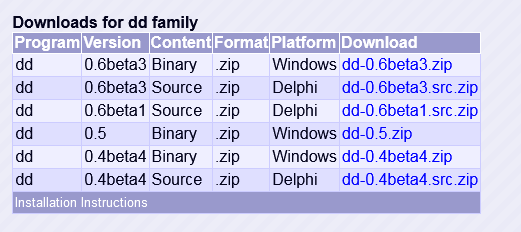
There are a few things to consider with this question. First, Windows by default does not have SSH installed. It also by default does not have dd installed either. The first thing you will need to do is make sure you have PuTTY installed so you can SSH on Windows. To make sure you can use dd properly, you will want to install dd for Windows.
Assuming you have already installed Putty and have booted the Linode into rescue mode and enabled SSH on the Linode, here are the steps I took to copy my disk over SSH to my Windows machine:
- Download
ddfor Windows http://www.chrysocome.net/dd - Unzip the most recent binary file then copy the
dd.exefile to a recognized Path. On my Windows machine that was underC:\Users\Admin\AppData\Local\Microsoft\WindowsApps - Create a local folder under
C:\calledLinode - Open up the command line in Windows
- From that Windows command line run
ssh root@$IP_ADDRESS "dd if=/dev/sda " | dd of=C:\Linode\linode.img - Jalankan
ssh root@127.0.0.1 -p 77777 "dd if=/dev/sda " | dd of=D:/Linode/linode.img --progress
77777 adalah port ssh jika port ssh bukan default 22
To find the recognized Path for your Windows machine, click the Start button then right click This PC. Choose Properties. From there, click Advanced System Settings. Click the Environment Variables button, and in the new pane look for the entry labeled Path. This is the folder you will want to drop dd.exe in.
Following those above steps, you should be able to copy your remote disk to your Windows machine using SSH and dd.
Tambahan:
Saat ini pilih yang dd-0.5.zip
Terkait: