
If you download the laragon lite from the official site, it will give you the old php 5.6. So when you not ready to move to php 8 and want to stay a little longer with php 7.4 in laragon, here are the instruction.
Downloading The PHP 7.4 Binary
You can go to https://windows.php.net/download and you can see the option to download the latest available PHP 7.4 version, I got PHP 7.4 (7.4.16) at the time, you can directly download it by this link https://windows.php.net/downloads/releases/php-7.4.16-Win32-vc15-x64.zip (the link may be dead, and you have to find the link of the latest version)
After it downloaded, you can create a folder inside C:\laragon\bin\php (or your own custom directory) named after the downloaded zip file. The folder name for me is php-7.4.16-Win32-VC15-x64 and then extract anything inside php-7.4.16-Win32-vc15-x64.zip to this folder.
Switching to PHP 7.4
Try to right-click on Laragon desktop app, choose PHP, and click the php-7.4.16-Win32-vc15-x64 option to change to this version.
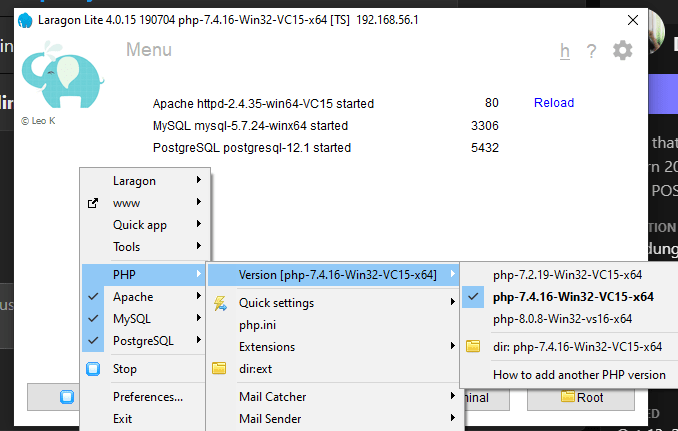
Reload or restart the Laragon’s apache server. When you hit the http://localhost on the browser, you should see this:

and by opening the Laragon’s Cmder console and type php --version, you should see this too

which indicates that the php 7.4 is properly installed.