

Form validation is a process of confirming the relevant information entered by the user in the input field. Here we will be validating a simple form that consists of a username, password and a confirm password using jQuery.
Prerequisites: You must be aware of the basics of HTML, CSS, JavaScript, and jQuery.
Approach:
- First of all, you need to create an index.html file that consists of Bootstrap 4 form with username, email, password, and confirm password as input fields. At the bottom of the “body” tag, include the “app.js” file having jQuery code for form validation.
- Create an app.js file that validates the whole form as given below in the code.
- In the app.js file, when the document is ready, hide all the error messages. Perform the validation task for all the input fields such as username, email, password, and confirm password.
index.html: The following HTML code demonstrates the form design for user input.
<!DOCTYPE html>
<html>
<head>
    <!-- Latest compiled and minified CSS -->
    <link rel="stylesheet" href=
    "https://maxcdn.bootstrapcdn.com/bootstrap/
    4.0.0/css/bootstrap.min.css">
    <!-- jQuery library -->
    <script src=
    "https://ajax.googleapis.com/ajax/libs/
    jquery/3.3.1/jquery.min.js">
    </script>
    <!-- Popper JS -->
    <script src=
    "https://cdnjs.cloudflare.com/ajax/libs/
    popper.js/1.12.9/umd/popper.min.js">
    </script>
    <!-- Latest compiled JavaScript -->
    <script src=
    "https://maxcdn.bootstrapcdn.com/bootstrap/
    4.0.0/js/bootstrap.min.js">
    </script>
</head>

<body><br>
    <h1 class="text-center text-success">
        Welcome to GeeksforGeeks
    </h1>

    <p class="text-center">
    FORM VALIDATION USING JQUERY
    </p>


    <div class="container">
    <div class="col-lg-8
        m-auto d-block">
        <form>
        <div class="form-group">
            <label for ="user">
                Username:
            </label>
            <input type="text"
                    name="username" id="usernames"
                    class="form-control">
            <h5 id="usercheck" style="color: red;" >
                    **Username is missing
            </h5>
        </div>


        <div class="form-group">
            <label for="user">
                    Email:
            </label>
            <input type="email" name="email"
                id="email" required
                class="form-control">
            <small id="emailvalid" class="form-text
                text-muted invalid-feedback">
                    Your email must be a valid email
            </small>
        </div>

        <div class="form-group">
            <label for="password">
                    Password:
            </label>
            <input type="password" name="pass"
                id="password" class="form-control">
            <h5 id="passcheck" style="color: red;">
                **Please Fill the password
            </h5>
        </div>

        <div class="form-group">
            <label for="conpassword">
                    Confirm Password:
            </label>
            <input type="password" name="username"
                    id="conpassword" class="form-control">
            <h5 id="conpasscheck" style="color: red;">
                **Password didn't match
            </h5>
        </div>

        <input type="submit" id="submitbtn"
            value="Submit" class="btn btn-primary">
        </form>
    </div>
    </div>

    <!-- Including app.js jQuery Script -->
    <script src="app.js"></script>
</body>
</html>
app.js: The following jQuery code for validation is used in the above HTML file .
// Document is ready
$(document).ready(function () {

// Validate Username
    $('#usercheck').hide();
    let usernameError = true;
    $('#usernames').keyup(function () {
        validateUsername();
    });

    function validateUsername() {
    let usernameValue = $('#usernames').val();
    if (usernameValue.length == '') {
    $('#usercheck').show();
        usernameError = false;
        return false;
    }
    else if((usernameValue.length < 3)||
            (usernameValue.length > 10)) {
        $('#usercheck').show();
        $('#usercheck').html
("**length of username must be between 3 and 10");
        usernameError = false;
        return false;
    }
    else {
        $('#usercheck').hide();
    }
    }

// Validate Email
    const email =
        document.getElementById('email');
    email.addEventListener('blur', ()=>{
    let regex =
/^([_\-\.0-9a-zA-Z]+)@([_\-\.0-9a-zA-Z]+)\.([a-zA-Z]){2,7}$/;
    let s = email.value;
    if(regex.test(s)){
        email.classList.remove(
                'is-invalid');
        emailError = true;
        }
        else{
            email.classList.add(
                'is-invalid');
            emailError = false;
        }
    })

// Validate Password
    $('#passcheck').hide();
    let passwordError = true;
    $('#password').keyup(function () {
        validatePassword();
    });
    function validatePassword() {
        let passwordValue =
            $('#password').val();
        if (passwordValue.length == '') {
            $('#passcheck').show();
            passwordError = false;
            return false;
        }
        if ((passwordValue.length < 3)||
            (passwordValue.length > 10)) {
            $('#passcheck').show();
            $('#passcheck').html
("**length of your password must be between 3 and 10");
            $('#passcheck').css("color", "red");
            passwordError = false;
            return false;
        } else {
            $('#passcheck').hide();
        }
    }

// Validate Confirm Password
    $('#conpasscheck').hide();
    let confirmPasswordError = true;
    $('#conpassword').keyup(function () {
        validateConfirmPassword();
    });
    function validateConfirmPassword() {
        let confirmPasswordValue =
            $('#conpassword').val();
        let passwordValue =
            $('#password').val();
        if (passwordValue != confirmPasswordValue) {
            $('#conpasscheck').show();
            $('#conpasscheck').html(
                "**Password didn't Match");
            $('#conpasscheck').css(
                "color", "red");
            confirmPasswordError = false;
            return false;
        } else {
            $('#conpasscheck').hide();
        }
    }

// Submit button
    $('#submitbtn').click(function () {
        validateUsername();
        validatePassword();
        validateConfirmPassword();
        validateEmail();
        if ((usernameError == true) &&
            (passwordError == true) &&
            (confirmPasswordError == true) &&
            (emailError == true)) {
            return true;
        } else {
            return false;
        }
    });
});
Output: Below is the output generated when the user directly hits the submit button.

Below is the output generated when the user enters invalid details in the form.

HTML is the foundation of webpages, is used for webpage development by structuring websites and web apps.You can learn HTML from the ground up by following this HTML Tutorial and HTML Examples.
CSS is the foundation of webpages, is used for webpage development by styling websites and web apps.You can learn CSS from the ground up by following this CSS Tutorial and CSS Examples.
jQuery is an open source JavaScript library that simplifies the interactions between an HTML/CSS document, It is widely famous with it’s philosophy of “Write less, do more”.
You can learn jQuery from the ground up by following this jQuery Tutorial and jQuery Examples.
Validation using inbuilt jQuery validation plugin
In this part, you get to know about the inbuilt validation method of jQuery.
Example 1 :
<!doctype html>
<html>
<head>
<meta charset="utf-8">
<title>Comment Form</title>
<!-- below we are including the jQuery and jQuery plugin .js files -->
<script src="https://ajax.googleapis.com/ajax/libs/jquery/3.5.1/jquery.min.js"></script>
<script src="https://cdn.jsdelivr.net/jquery.validation/1.16.0/jquery.validate.min.js"></script>
<script src="https://cdn.jsdelivr.net/jquery.validation/1.16.0/additional-methods.min.js"></script>
<script>
// user have to use id for form and call validate method
$("#commonForm").validate();
</script>
</head>
<body>
<form class="cmxform" id="commonForm" method="get" action="form-handler.html" autocomplete="off">
<fieldset>
<legend>GFG Form</legend>

<p>
<label for="cname">Name <span>(required at least 2 character)</span></label>
<!--User have to set the constraints in attribute form-->
<input id="cname" name="name" minlength="2" type="text" required></input>
</p>

<p>
<label for="cemail">Email <span>(required, won't be published)</span></label>
<input id="cemail" type="email" name="email" required></input>
</p>

<p>
<label for="curl">URL <span>(Optional)</span></label>
<input id="curl" type="url" name="url" required></input>
</p>

<p>
<label for="ccomment">Your comment<span>(required)</span></label>
<textarea id="ccomment" name="comment" required></textarea>
</p>

<p>
<input class="submit" type="submit" value="submit">
</p>

</fieldset>
</form>
</body>
</html>
Note: Run the above code by creating a .html file using a text editor.

here if we do not fill the email section

here if we do not fill the comment section
Example 2 : (Important)
The jQuery plugin makes simpler the code of validation for the clientside.
The plugin comes bundled with a useful set of validation methods, including URL and email validation while providing an API to write your own methods.
follow the below example which makes more clarifications regarding it.
<!doctype html>
<html>
<head>
<meta charset="utf-8">
<title>Comment Form</title>
    <!-- below we are including the jQuery and jQuery plugin .js files -->
<script src="https://ajax.googleapis.com/ajax/libs/jquery/3.5.1/jquery.min.js"></script>
<script src="https://cdn.jsdelivr.net/jquery.validation/1.16.0/jquery.validate.min.js"></script>
<script src="https://cdn.jsdelivr.net/jquery.validation/1.16.0/additional-methods.min.js"></script>
<script>
$().ready(function(){

$("#signupForm").validate({
// in 'rules' user have to specify all the constraints for respective fields
rules : {
firstname : "required",
lastname : "required",
username : {
required : true,
minlength : 2 //for length of lastname
},
password : {
required : true,
minlength : 5
},
confirm_password : {
required : true,
minlength : 5,
equalTo : "#password" //for checking both passwords are same or not
},
email : {
required : true,
email : true
},
agree : "required"
},
    // in 'messages' user have to specify message as per rules
messages : {
firstname : "Please enter your firstname",
lastname : "Please enter your lastname",
username :{
required : "Please enter a username",
minlength : "Your username must consist of at least 2 characters"
},
password : {
required : "Please enter a password",
minlength : "Your password must be consist of at least 5 characters"
},
confirm_password : {
required : "Please enter a password",
minlength : "Your password must be consist of at least 5 characters",
equalTo : "Please enter the same password as above"
},
agree : "Please accept our policy"
}
});
});

</script>
</head>
<body>
<form class="cmxform" id="signupForm" method="get" action="form-handler.html" autocomplete="off">
<fieldset>
<legend>GFG sign-up Form</legend>


<p>
<label for="firstname">Firstname</label>
<input id="firstname" name="firstname" type="text"></input>
</p>


<p>
<label for="lastname">Lastname</label>
<input id="lastname" name="lastname" type="text"></input>
</p>


<p>
<label for="username">Username</label>
<input id="username" name="username" type="text"></input>
</p>


<p>
<label for="password">Password</label>
<input id="password" name="password" type="password"></input>
</p>


<p>
<label for="confirm_password">Confirm password</label>
<input id="confirm_password" name="confirm_password" type="password"></input>
</p>


<p>
<label for="email">Email</label>
<input id="email" name="email" type="email"></input>
</p>


<p>
<label for="agree">Please agree to our policy</label>
<input id="agree" name="agree" type="checkbox"></input>
</p>


<p>
<input class="submit" type="submit" value="submit">
</p>


</fieldset>
</form>
</body>
</html>
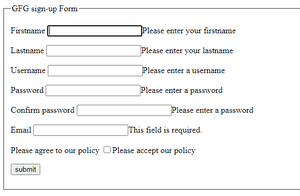
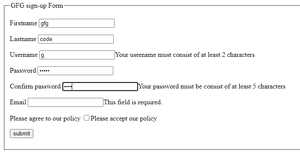
Note: Run the above code by creating a .html file using a text editor.
Attention reader! Don’t stop learning now. Get hold of all the important HTML concepts with the Web Design for Beginners | HTML course.