

This article explains the process of performing SQL delete activity for duplicate rows from a SQL table.
Introduction
We should follow certain best practices while designing objects in SQL Server. For example, a table should have primary keys, identity columns, clustered and non-clustered indexes, constraints to ensure data integrity and performance. Even we follow the best practices, and we might face issues such as duplicate rows. We might also get these data in intermediate tables in data import, and we want to remove duplicate rows before actually inserting them in the production tables.
Suppose your SQL table contains duplicate rows and you want to remove those duplicate rows. Many times, we face these issues. It is a best practice as well to use the relevant keys, constrains to eliminate the possibility of duplicate rows however if we have duplicate rows already in the table. We need to follow specific methods to clean up duplicate data. This article explores the different methods to remove duplicate data from the SQL table.
Let’s create a sample Employee table and insert a few records in it.
|
CREATE TABLE Employee
(
[ID] INT identity(1,1),
[FirstName] Varchar(100),
[LastName] Varchar(100),
[Country] Varchar(100),
)
GO
Insert into Employee ([FirstName],[LastName],[Country] )values(‘Raj’,‘Gupta’,‘India’),
(‘Raj’,‘Gupta’,‘India’),
(‘Mohan’,‘Kumar’,‘USA’),
(‘James’,‘Barry’,‘UK’),
(‘James’,‘Barry’,‘UK’),
(‘James’,‘Barry’,‘UK’)
|
In the table, we have a few duplicate records, and we need to remove them.
SQL delete duplicate Rows using Group By and having clause
In this method, we use the SQL GROUP BY clause to identify the duplicate rows. The Group By clause groups data as per the defined columns and we can use the COUNT function to check the occurrence of a row.
For example, execute the following query, and we get those records having occurrence greater than 1 in the Employee table.
|
SELECT [FirstName],
[LastName],
[Country],
COUNT(*) AS CNT
FROM [SampleDB].[dbo].[Employee]
GROUP BY [FirstName],
[LastName],
[Country]
HAVING COUNT(*) > 1;
|
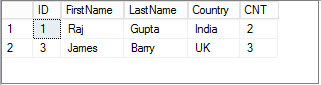
In the output above, we have two duplicate records with ID 1 and 3.
- Emp ID 1 has two occurrences in the Employee table
- Emp ID 3 has three occurrences in the Employee table
We require to keep a single row and remove the duplicate rows. We need to remove only duplicate rows from the table. For example, the EmpID 1 appears two times in the table. We want to remove only one occurrence of it.
We use the SQL MAX function to calculate the max id of each data row.
|
SELECT *
FROM [SampleDB].[dbo].[Employee]
WHERE ID NOT IN
(
SELECT MAX(ID)
FROM [SampleDB].[dbo].[Employee]
GROUP BY [FirstName],
[LastName],
[Country]
);
|
In the following screenshot, we can see that the above Select statement excludes the Max id of each duplicate row and we get only the minimum ID value.
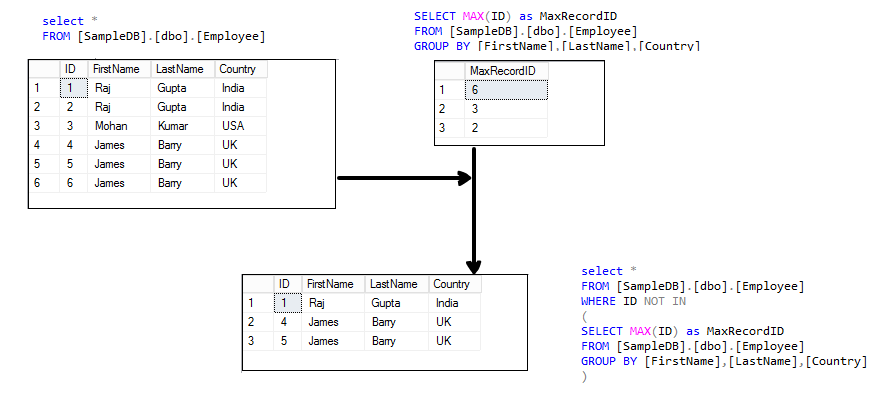 To remove this data, replace the first Select with the SQL delete statement as per the following query.
|
DELETE FROM [SampleDB].[dbo].[Employee]
WHERE ID NOT IN
(
SELECT MAX(ID) AS MaxRecordID
FROM [SampleDB].[dbo].[Employee]
GROUP BY [FirstName],
[LastName],
[Country]
);
|
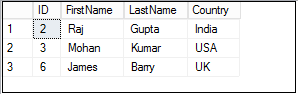
Once you execute the delete statement, perform a select on an Employee table, and we get the following records that do not contain duplicate rows.
SQL delete duplicate Rows using Common Table Expressions (CTE)
We can use Common Table Expressions commonly known as CTE to remove duplicate rows in SQL Server. It is available starting from SQL Server 2005.
We use a SQL ROW_NUMBER function, and it adds a unique sequential row number for the row.
In the following CTE, it partitions the data using the PARTITION BY clause for the [Firstname], [Lastname] and [Country] column and generates a row number for each row.
|
WITH CTE([firstname],
[lastname],
[country],
duplicatecount)
AS (SELECT [firstname],
[lastname],
[country],
ROW_NUMBER() OVER(PARTITION BY [firstname],
[lastname],
[country]
ORDER BY id) AS DuplicateCount
FROM [SampleDB].[dbo].[employee])
SELECT *
FROM CTE;
|
In the output, if any row has the value of [DuplicateCount] column greater than 1, it shows that it is a duplicate row.
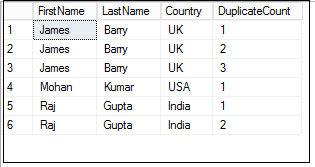
We can remove the duplicate rows using the following CTE.
|
WITH CTE([FirstName],
[LastName],
[Country],
DuplicateCount)
AS (SELECT [FirstName],
[LastName],
[Country],
ROW_NUMBER() OVER(PARTITION BY [FirstName],
[LastName],
[Country]
ORDER BY ID) AS DuplicateCount
FROM [SampleDB].[dbo].[Employee])
DELETE FROM CTE
WHERE DuplicateCount > 1;
|
It removes the rows having the value of [DuplicateCount] greater than 1
RANK function to SQL delete duplicate rows
We can use the SQL RANK function to remove the duplicate rows as well. SQL RANK function gives unique row ID for each row irrespective of the duplicate row.
In the following query, we use a RANK function with the PARTITION BY clause. The PARTITION BY clause prepares a subset of data for the specified columns and gives rank for that partition.
|
SELECT E.ID,
E.firstname,
E.lastname,
E.country,
T.rank
FROM [SampleDB].[dbo].[Employee] E
INNER JOIN
(
SELECT *,
RANK() OVER(PARTITION BY firstname,
lastname,
country
ORDER BY id) rank
FROM [SampleDB].[dbo].[Employee]
) T ON E.ID = t.ID;
|
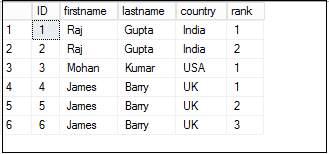
In the screenshot, you can note that we need to remove the row having a Rank greater than one. Let’s remove those rows using the following query.
|
DELETE E
FROM [SampleDB].[dbo].[Employee] E
INNER JOIN
(
SELECT *,
RANK() OVER(PARTITION BY firstname,
lastname,
country
ORDER BY id) rank
FROM [SampleDB].[dbo].[Employee]
) T ON E.ID = t.ID
WHERE rank > 1;
|